 +1 408-915-6865
Dacor Wall Oven Not Turning On
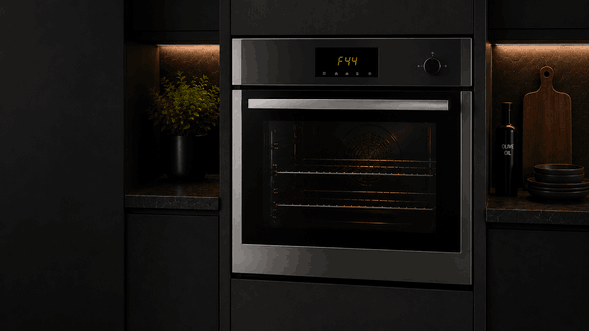
A Dacor wall oven not turning on can stop cooking before it even begins. The display may stay dark, the control panel may not respond, or the oven may light up briefly and then shut down. In some cases, the clock works, but Bake, Broil, or Convection will not start.
For homeowners and small businesses in Campbell, San Jose, and the Bay Area, this problem should be checked carefully. A wall oven that will not turn on may involve power supply, control panel failure, door switch issues, thermal protection, wiring problems, or a main control board fault.
Hotline Appliance Repair helps local customers with Dacor wall oven startup problems, including no power, unresponsive controls, failed heating commands, display issues, lock-related interruptions, and electronic control faults.
Why the Oven May Stay Off
A Dacor wall oven needs stable power and a working control system before it can start any cooking mode. If the appliance cannot confirm power, door status, temperature control, or safety conditions, it may refuse to turn on.
This issue can appear in different ways. Some ovens are completely dark. Others show a clock but will not start heating. Some respond to touch commands but cancel the mode right away.
The most important detail is whether the oven has no display, partial display, or display response without heating.
Startup Problems You May Notice
The Display Is Completely Dark
If the control panel has no lights, clock, or response, the issue may involve incoming power, a tripped circuit, wiring, internal fuse, or control board failure.
The Panel Lights Up but the Oven Will Not Start
If the display works but the oven refuses to begin, the problem may be connected to a control setting, door switch, keypad, relay, sensor signal, or main control fault.
The Oven Starts and Then Shuts Off
An oven that turns on briefly and stops may be reacting to a safety limit, overheating signal, cooling fan problem, sensor issue, or electronic interruption.
The Controls Beep but Do Not Respond
Beeping without normal response can point to a stuck key, locked controls, touch-panel issue, or failed communication between the user interface and main control.
Possible Causes Behind the Issue
A Dacor wall oven may fail to turn on for several reasons.
A power supply problem can make the oven completely unresponsive or leave only part of the control system working. Wall ovens require stable electrical power, and partial power loss can create confusing symptoms.
A control panel or main control board issue can also prevent the appliance from accepting commands. The oven may display time or symbols but fail to move into a cooking mode.
Door switch or lock-related problems may stop the oven from starting if the appliance cannot confirm that the door is in the correct position.
Thermal protection, sensor faults, relay failure, cooling fan problems, or damaged wiring may also interrupt startup. Because these systems are electrical and safety-related, the oven should be diagnosed professionally rather than opened or tested at home.
Safe Checks Before Service
You can make a few safe observations before scheduling repair.
Check whether the oven is fully dark or partially responsive. Notice whether the clock works, whether buttons beep, and whether any lock symbol, error message, or flashing indicator appears.
Think about whether the issue started after a power outage, cleaning cycle, heavy use, or breaker trip. Write down any message on the display before resetting anything.
Make sure the oven door closes normally and that nothing is blocking it from the outside.
Do not remove the oven from the wall, open panels, test wiring, replace fuses, bypass switches, or continue trying to start the oven if it smells hot, sparks, trips power, or behaves unpredictably.
When to Stop Trying to Use the Oven
Stop using the oven if it stays dark, turns off immediately after starting, trips the breaker, shows repeated errors, or the control panel becomes unresponsive.
You should also stop if the oven smells electrical, makes unusual clicking sounds, locks unexpectedly, or starts and cancels cycles without a clear reason. Repeated attempts may not solve the problem and can make the fault harder to diagnose.
How Hotline Appliance Repair Checks Dacor Wall Ovens
Hotline Appliance Repair checks the oven as a full power, control, and safety system. A technician may review the display response, incoming power behavior, control-panel commands, door switch signal, lock status, sensor readings, relay function, cooling fan response, and control-board communication.
This helps determine whether the Dacor wall oven has a power issue, control failure, keypad fault, sensor problem, thermal interruption, door-switch concern, or internal wiring fault.
For customers in Campbell, San Jose, and the Bay Area, proper diagnosis helps restore safe oven operation and avoid unnecessary part replacement.
Service Area
Hotline Appliance Repair serves Campbell, San Jose, and the Bay Area, including Santa Clara, Sunnyvale, Cupertino, Mountain View, Palo Alto, Fremont, Milpitas, San Mateo, and nearby communities.
FAQ
Why is my Dacor wall oven not turning on?
A Dacor wall oven may not turn on because of a power supply issue, failed control panel, main control board fault, door switch problem, thermal fuse, sensor issue, or wiring failure.
Why does the display work but the oven will not start?
The control panel may have power, but the oven may not be receiving the correct signal to begin heating because of a relay, sensor, keypad, door switch, or control-board problem.
Can a power outage cause a wall oven to stop working?
Yes. A power outage or surge can affect the oven’s electronic controls, especially if the oven was in use when the power changed.
Should I pull the oven out to inspect it?
No. Wall ovens are heavy and hardwired or tightly installed. Do not remove the unit, open panels, or test wiring yourself.
When should I call for Dacor wall oven repair?
Service is recommended when the oven stays dark, controls do not respond, the oven starts and shuts off, errors repeat, or the appliance trips power.
Contact Information
Hotline Appliance Repair – San Jose
📍 Address: 665 Nido, Campbell, CA 95008
📧 Email: hotlineappliancerepair@gmail.com
📞 Phone: +1 408-915-6865
🕒 Open Hours: Monday – Sunday: 8:00 AM – 8:00 PM
