 +1 408-915-6865
Speed Queen Commercial Top Load Washer Card Reader Payment and Programming Errors
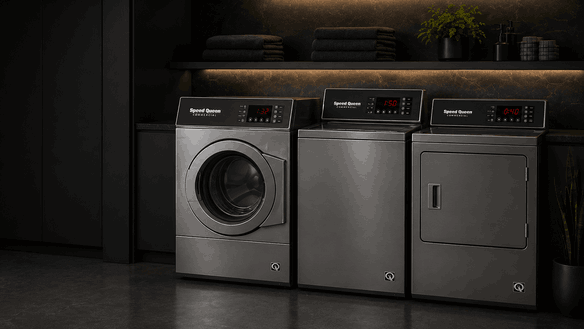
A Speed Queen commercial top load washer card reader payment or programming error can stop a washer from starting even when the machine itself appears ready. The display may show a payment-related message, the reader may reject cards, the washer may not recognize a paid cycle, or the control may fail to move from payment mode into wash mode.
For laundromats, apartment laundry rooms, shared housing, and small businesses in Campbell, San Jose, and nearby Bay Area communities, payment-system problems can quickly affect customer use and daily laundry operations. Hotline Appliance Repair helps diagnose Speed Queen commercial washer issues involving card reader response, payment communication, control-board behavior, programming faults, cycle-start lockouts, and related washer operation problems.
Why Payment and Programming Errors Matter
A commercial washer depends on communication between the payment system and the washer control. The card reader must accept the transaction, send the correct start signal, and allow the washer to begin the selected cycle.
When a Speed Queen commercial top load washer has a card reader or programming error, the problem may not be inside the wash system itself. The washer may be mechanically ready, but the payment interface, control settings, communication wiring, or programming logic may prevent operation.
Because payment systems involve business settings and access controls, these issues should be handled by authorized service only, not through bypass attempts.
Common Error Patterns You May Notice
Card Reader Does Not Respond
If the reader stays blank, does not light up, or fails to recognize cards, the issue may involve reader power, communication wiring, the payment module, or control-board response.
Payment Is Accepted but Washer Does Not Start
If the card is charged or accepted but the washer remains idle, the payment signal may not be reaching the washer control correctly.
Programming Message or Setup Error Appears
A programming-related alert may indicate that the washer control, vend settings, cycle pricing, or payment interface configuration is not communicating normally.
Washer Starts Only Sometimes
Intermittent payment response may point to loose connections, reader failure, control-board issues, software/settings conflict, or unstable power to the payment system.
Possible Causes of Speed Queen Payment System Problems
A failed or unresponsive card reader can prevent the washer from accepting payment. The reader may have power trouble, communication failure, worn contact points, or internal electronic issues.
The washer control board may also be involved. If it cannot receive or process the payment signal, the machine may remain locked in standby even after payment is made.
Programming or vend-setting conflicts can create startup problems when the washer does not match the expected payment configuration. This can happen after service, replacement parts, power events, or incorrect setup changes.
Other possible causes include damaged wiring between the reader and washer control, loose connectors, payment network issues, power interruption, stored faults, or a failed interface module.
Safe Observations Before Service
You can note a few details without opening the washer or changing settings.
Check whether the card reader lights up, whether it responds to a card, and whether the washer display changes after payment. Notice whether the issue affects one machine or several machines in the same laundry area.
Pay attention to error messages, blank reader screens, repeated rejected payments, delayed starts, or washers that stay locked in payment mode. If a specific code or message appears, write it down before resetting the machine.
Do not open the payment reader, bypass payment wiring, change vend programming, access coin/card controls, or attempt to override paid-cycle settings. Payment and programming issues should be handled through authorized service procedures.
When to Stop Using the Washer
Stop using the affected washer if payments are being accepted but cycles are not starting, if the same error returns, or if the reader behaves unpredictably.
You should also avoid using the machine if there is a burning smell, electrical behavior, display flickering, repeated power loss, or multiple machines showing similar payment errors. These symptoms may indicate a control, wiring, payment interface, or power-related issue that needs inspection.
How Hotline Appliance Repair Diagnoses Commercial Payment and Programming Issues
Hotline Appliance Repair checks the washer as a complete commercial control system. A technician may inspect card reader response, payment-to-control communication, washer control-board signals, wiring condition, vend configuration behavior, stored fault messages, power stability, and cycle-start response.
For Speed Queen commercial washer repair in Campbell, San Jose, and the Bay Area, this diagnostic approach helps determine whether the problem comes from a failed card reader, payment interface issue, programming conflict, control-board fault, wiring problem, or power-related condition.
Service Area
Hotline Appliance Repair serves Campbell, San Jose, and the Bay Area, including Santa Clara, Sunnyvale, Cupertino, Mountain View, Palo Alto, Fremont, Milpitas, San Mateo, and nearby communities.
FAQ
Why is my Speed Queen commercial washer card reader not working?
A Speed Queen card reader may stop working because of reader failure, power trouble, communication wiring issues, payment module problems, control-board faults, or programming conflicts.
Why does the washer not start after payment?
The payment may be accepted, but the washer may not be receiving or processing the start signal from the payment system.
Can programming errors stop a commercial washer from starting?
Yes. Incorrect or corrupted vend settings, control configuration issues, or payment interface communication problems can prevent the washer from starting.
Should I try to bypass the card reader?
No. Payment systems should not be bypassed or modified. A technician should inspect the reader, wiring, controls, and programming safely.
When should I call for service?
Service is recommended when the card reader does not respond, payments do not start cycles, programming errors appear, multiple machines show payment issues, or the washer stays locked in payment mode.
Contact Information
Hotline Appliance Repair – San Jose
📍 Address: 665 Nido, Campbell, CA 95008
📧 Email: hotlineappliancerepair@gmail.com
📞 Phone: +1 408-915-6865
🕒 Open Hours: Monday – Sunday: 8:00 AM – 8:00 PM
