 +1 408-915-6865
Thermador Electric Cooktop D or E Display Automatic Time Limit
A Thermador electric cooktop D or E display automatic time limit problem can stop normal cooking even when the glass surface, touch controls, and cooking zones appear to have power. The display may show D, E, or a time-limit style warning, and the cooktop may stop heating until the control is acknowledged or the fault is checked.
For homeowners and small businesses in Campbell, San Jose, and the Bay Area, this issue can be confusing because not every display message means the same thing. Some warnings are protective operating features, while others point to a control or electronics fault.
Hotline Appliance Repair helps local customers with Thermador electric cooktop problems, including display errors, automatic time-limit interruptions, touch-control faults, overheating messages, zone shutdowns, and related electric cooktop control issues.
What D, E, and Automatic Time Limit Messages Mean
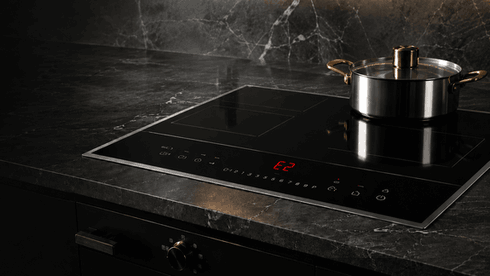
Thermador’s official electric cooktop support identifies “D” or “E” on the display as an operational fault or error. The recommended first response is to switch the appliance off and on again; if the message returns, Thermador advises calling support and providing the exact error code.
The automatic time limitation is described differently. Thermador lists F8 + H/h with cooking zones not heating as a condition where a cooking zone has operated continuously for an extended period without interaction, triggering automatic time limitation. In that case, touching a control element allows the user to set the cooking zone again.
That means a D or E display should not be confused with a normal time-limit shutoff unless the cooktop also shows the time-limit behavior described by Thermador.
How the Problem May Show Up
The Cooktop Stops Heating
A cooking zone may shut off or refuse to heat. This may happen because the automatic time limit was triggered or because the control system detected a fault.
D or E Appears on the Display
If D or E appears, the cooktop may be reporting an operational error rather than a normal cooking timer condition.
The Zone Turns Off After Long Use
If a zone has been operating for a long time without user input, the cooktop may stop heating as a safety and control feature.
The Message Returns After Restart
If the same display message returns after the appliance is switched off and back on, the issue likely needs diagnosis instead of repeated resets.
Possible Causes Behind These Display Problems
A Thermador electric cooktop D or E display may involve a touch-control fault, electronic control issue, overheating condition, moisture or residue near the controls, communication problem, or an internal component fault.
An automatic time limitation event may be normal if the cooking zone was left running for a long period without interaction. However, if it happens too often, happens too quickly, or appears together with other display warnings, the cooktop may have a control-response issue.
Heat around the control area can also affect operation. Thermador lists several cooktop errors related to overheated electronics or hot cookware near the control panel, which can cause zones to shut off for protection.
Safe Checks Before Requesting Service
You can make a few safe observations before requesting repair.
Write down the exact display message. Note whether it shows D, E, F8 + H/h, or another symbol. The exact message matters because each one points to a different condition.
Notice when the problem appears. Does it happen immediately after turning the cooktop on, after long cooking, when using a specific zone, or after the control area becomes warm?
Check whether cookware, pans, towels, moisture, or food residue are near the touch-control area. Keep the control surface clean and dry from the outside only.
Do not remove the cooktop, open the glass surface, test wiring, reset breakers repeatedly, or keep using the appliance if it smells hot, sparks, cracks, or shuts down unpredictably.
When to Stop Using the Cooktop
Stop using the cooktop if D or E returns after restart, if the display behaves unpredictably, if zones shut off repeatedly, or if the controls stop responding normally.
You should also stop using it if the glass is cracked, the cooktop overheats, there is a burning smell, or the appliance turns on or off without normal control input.
A repeated display error may point to an electronic issue that needs professional diagnosis.
How Hotline Appliance Repair Diagnoses Thermador Electric Cooktop Display Issues
Hotline Appliance Repair checks the cooktop as a complete control and heating system. A technician may evaluate the stored display behavior, touch-control response, zone operation, overheating patterns, control-board communication, power response, and whether the issue is related to normal time limitation or an active fault.
This helps determine whether the problem is caused by automatic time limitation, a control-panel issue, electronics overheating, touch-control failure, wiring communication, or another internal cooktop fault.
For Thermador electric cooktop repair in Campbell, San Jose, and the Bay Area, accurate diagnosis helps restore safe cooking operation and avoid unnecessary part replacement.
Service Area
Hotline Appliance Repair serves Campbell, San Jose, and the Bay Area, including Santa Clara, Sunnyvale, Cupertino, Mountain View, Palo Alto, Fremont, Milpitas, San Mateo, and nearby communities.
FAQ
What does D or E mean on a Thermador electric cooktop?
Thermador lists “D” or “E” as an operational fault or error. If the message returns after switching the appliance off and on, support or service is recommended.
What is automatic time limitation on a Thermador cooktop?
It is a protective feature that can stop a cooking zone after it has operated continuously for an extended period without interaction. Thermador lists this with F8 + H/h and cooking zones not heating.
Does D or E always mean automatic time limit?
No. Thermador separates D/E operational faults from F8 + H/h automatic time limitation, so the exact display message should be checked carefully.
Can I keep resetting the cooktop?
No. If the same message returns, repeated resets may hide useful diagnostic information without fixing the cause.
When should I call Hotline Appliance Repair?
Call for service if D, E, or repeated time-limit behavior returns, the cooktop stops heating, the controls do not respond, or the appliance shows overheating, sparking, or unsafe operation.
Contact Information
Hotline Appliance Repair – San Jose
📍 Address: 665 Nido, Campbell, CA 95008
📧 Email: hotlineappliancerepair@gmail.com
📞 Phone: +1 408-915-6865
🕒 Open Hours: Monday – Sunday: 8:00 AM – 8:00 PM
