 +1 408-915-6865
Thermador Oven Error Code Beeping and Not Clearing
A Thermador oven error code beeping and not clearing problem usually means the oven control has detected a fault that still needs attention. The display may keep showing the same code, the oven may beep repeatedly, or the control panel may refuse to return to normal cooking mode.
For homeowners and small businesses in Campbell, San Jose, and the Bay Area, this issue should be handled carefully. A Thermador oven error may involve the temperature sensor, door latch, cooling fan, keypad, relay board, communication circuit, or electronic control system.
Hotline Appliance Repair helps local customers with Thermador oven error-code problems, including persistent beeping, codes that will not clear, control-panel lockups, heating interruptions, sensor faults, latch issues, and related oven control failures.
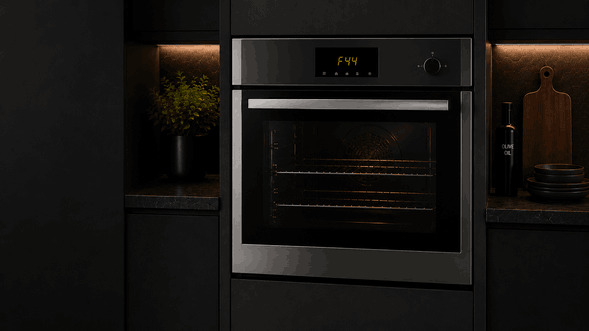
What a Persistent Thermador Oven Error Usually Means
Thermador’s official oven error-code support explains that when a fault/error code appears, the user can press the TIMERS key or another key to stop the beeping, reset the oven if necessary, and if the error continues to show, turn off the oven and contact Thermador support or book service.
That means the beeping itself is often the alarm response, not the root cause. If the code will not clear, the oven is likely still seeing a condition that prevents normal operation.
A persistent error may appear after a power interruption, during preheat, after self-clean, when the oven tries to lock the door, or when a sensor reading does not match the expected range.
How the Problem May Show Up
The Oven Keeps Beeping
The oven may beep until a key is pressed, but the code may remain on the display. If the code returns after the beeping stops, the fault is still active.
The Error Code Will Not Clear
A code that remains after a reset may point to an ongoing sensor, latch, keypad, fan, relay, or control-board issue.
The Oven Will Not Start Cooking
Some faults prevent the oven from heating because the control cannot confirm a safe operating condition.
The Code Appears After a Software Update
Thermador also notes that certain codes, including E0211, E1601, and E0510, may appear during a Home Connect software update. These should be treated differently from normal cooking faults because the timing and update status matter.
Possible Causes Behind Beeping and Codes That Stay On
A Thermador oven error code beeping and not clearing issue may come from several areas.
A temperature sensor problem can cause the oven to misread cavity temperature. This may stop preheat, interrupt cooking, or trigger a fault when the oven cannot confirm safe heating behavior.
A door latch or lock fault may appear after self-clean or when the oven tries to confirm the door position. If the control cannot read the latch correctly, the oven may stay locked, refuse to start, or continue beeping.
A keypad or touch-control issue can also create repeated alerts. The oven may not accept commands correctly, or the control may read a stuck or missing input.
Electronic control faults, relay-board problems, cooling fan issues, or communication errors can also cause codes that do not clear with normal keypad input.
Safe Checks Before Requesting Service
You can make a few safe observations before calling for repair.
Write down the exact error code before clearing anything. Also note when it appears: during startup, preheat, bake, broil, self-clean, cooling, or after a power event.
Press the key Thermador recommends to stop the beeping, but do not keep forcing the oven through repeated cooking attempts if the error returns.
Check whether the oven is hot, locked, or still cooling from a previous cycle. If the code appeared after self-clean, let the oven cool fully before assuming the latch has failed.
Do not remove panels, test wiring, pull the oven from the cabinet, inspect control boards, bypass safety switches, or continue using the oven if it overheats, smells electrical, or will not respond to controls.
When to Stop Using the Oven
Stop using the oven if the same code returns, the beeping continues, the oven will not shut off normally, the door stays locked, or the control panel behaves unpredictably.
You should also stop if the oven heats without normal control response, fails to preheat, shows a burning smell, or displays a code again immediately after reset.
A code that will not clear is not just an annoyance. It may be the oven’s way of preventing unsafe heating or protecting internal components.
How Hotline Appliance Repair Diagnoses Thermador Oven Error Codes
Hotline Appliance Repair checks the oven as a complete control and safety system. A technician may evaluate the stored code, keypad response, temperature sensor readings, latch operation, cooling fan behavior, relay response, wiring communication, and electronic control performance.
This helps determine whether the problem is caused by a sensor fault, latch failure, stuck keypad, fan issue, relay-board problem, software/update condition, or main control fault.
For Thermador oven repair in Campbell, San Jose, and the Bay Area, accurate diagnosis helps restore safe oven operation and prevents unnecessary part replacement.
Service Area
Hotline Appliance Repair serves Campbell, San Jose, and the Bay Area, including Santa Clara, Sunnyvale, Cupertino, Mountain View, Palo Alto, Fremont, Milpitas, San Mateo, and nearby communities.
FAQ
Why is my Thermador oven beeping with an error code?
The oven is alerting you that it has detected a fault/error condition. Thermador says pressing the TIMERS key or another key may stop the beeping, but if the code remains, the oven needs further attention.
Why won’t the Thermador oven error code clear?
If the code returns or stays on the display, the oven may still be detecting a sensor, latch, keypad, fan, relay, communication, or control-board fault.
Can I keep resetting the oven?
No. If the same error keeps coming back, repeated resets may hide useful diagnostic information without fixing the problem.
What should I do if the code appears during a Home Connect update?
Thermador lists E0211, E1601, and E0510 as codes that can appear during a Home Connect software update, so the update timing should be noted before service.
When should I call Hotline Appliance Repair?
Call for service if the error code does not clear, the oven keeps beeping, the control panel will not respond, the door stays locked, or the oven will not heat safely.
Contact Information
Hotline Appliance Repair – San Jose
📍 Address: 665 Nido, Campbell, CA 95008
📧 Email: hotlineappliancerepair@gmail.com
📞 Phone: +1 408-915-6865
🕒 Open Hours: Monday – Sunday: 8:00 AM – 8:00 PM
